의존관계 자동 주입
Many Spring Boot developers like their apps to use auto-configuration, component scan and be able to define extra configuration on their "application class". A single @SpringBootApplication annotation can be used to enable those three features, that is:
-
@EnableAutoConfiguration: enable Spring Boot’s auto-configuration mechanism
-
@ComponentScan: enable @Component scan on the package where the application is located (see the best practices)
-
@Configuration: allow to register extra beans in the context or import additional configuration classes
스프링 부트에서는 일일이 Bean 을 설정하지 않고도 의존관계를 자동으로 주입해주는 기능을 제공한다.
이 기능은 크게 @ComponentScan 과 @Autowired 어노테이션에 의해 이루어진다
@ComponentScan
- @ComponentScan 어노테이션을 @Configuration 이 붙은 설정 클래스에 같이 사용해주면, 모든 애플리케이션 컴포넌트들 ( @Component, @Service, @Repository, @Controller etc.) 이 자동으로 스프링 빈에 등록되게 된다.
-
@Component : 컴포넌트 스캔에서 사용
-
@Controlller : 스프링 MVC 컨트롤러에서 사용
-
@Service : 스프링 비즈니스 로직에서 사용
-
@Repository : 스프링 데이터 접근 계층에서 사용
-
@Configuration : 스프링 설정 정보에서 사용
@Component
- @ComponentScan 의 스캔 대상이 되기 위해 각 클래스에 붙여야 하는 어노테이션이다.
@Autowired
- @Bean으로 직접 설정 정보를 작성해 의존 관계를 명시하지 않고, 의존관계를 자동으로 주입해주는 어노테이션.
이 어노테이션은 생성자 위에 지정해준다. 그렇게 해두면 애플리케이션 동작 시에 어노테이션이 붙은 생성자를 스프링이 자동으로 주입해주는 방식이다.
탐색 위치와 기본 스캔 대상
모든 자바 클래스를 스캔하지 않고, 필요한 위치부터 탐색하도록 해줄 수 있다.
@ComponentScan(
          basePackages = "hello.core",
}
여러 시작 위치를 지정도 가능.
하지만 패키지 위치를 지정하지 않고 설정 정보 클래스 위치를 디렉초리 최상단에 두면 훨씬 간편해진다.
Filter
- 컴포넌트 스캔 대상 범위를 지정해 줄 수 있다. 어노테이션을 따로 빼서 생성해 줄 수 있는데 new->class->annotation 으로 생성하면 된다 (IntelliJ)
package yesol.core.scan.filter;

import java.lang.annotation.*;

@Target(ElementType.TYPE)
@Retention(RetentionPolicy.RUNTIME)
@Documented
public @interface MyIncludeComponent {
}
컴포넌스 스캔에서 추가 할 어노테이션 생성.
package yesol.core.scan.filter;

@MyExcludeComponent
public class BeanB {
}
추가할 클래스 위에 어노테이션을 붙이면 끝
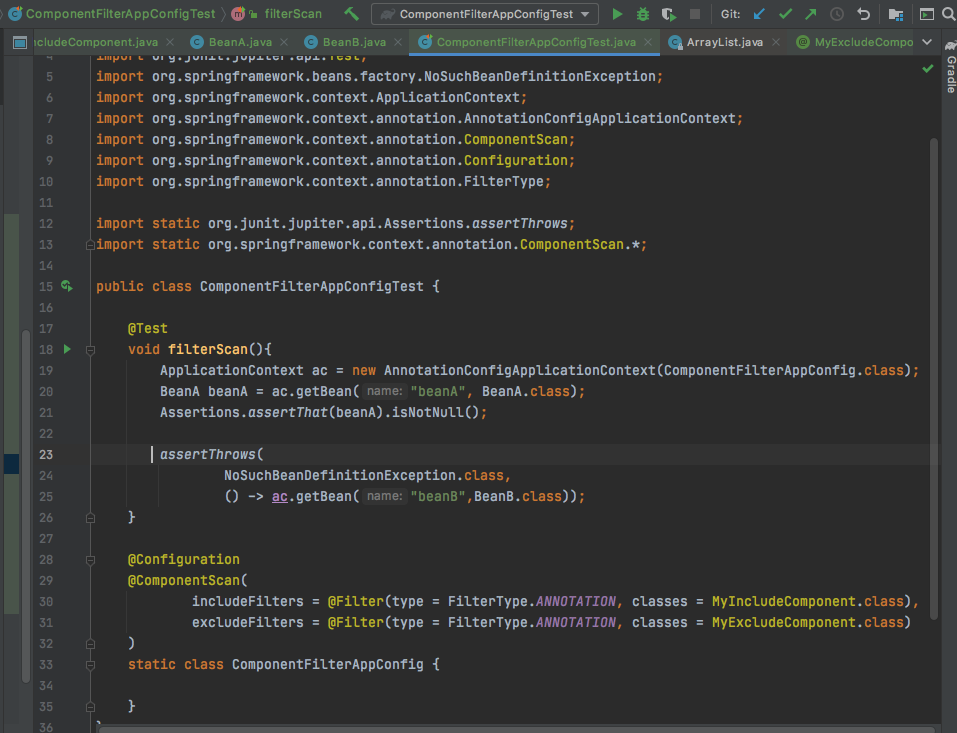
이렇게 @CompoentScan 어노테이션 안에 include, exclude 할 클래스를 지정해 주면 된다.
Filter Type 옵션
-
ANNOTATION: 기본값, 애노테이션을 인식해서 동작한다. ex) org.example.SomeAnnotation
-
ASSIGNABLE_TYPE: 지정한 타입과 자식 타입을 인식해서 동작한다. ex) org.example.SomeClass
-
ASPECTJ: AspectJ 패턴 사용
ex) org.example..*Service+ -
REGEX: 정규 표현식
ex) org\.example\.Default.* -
CUSTOM: TypeFilter 이라는 인터페이스를 구현해서 처리 ex)
org.example.MyTypeFilter
'CSE > Spring' 카테고리의 다른 글
| Lombok 라이브러리 - 생성자 자동 생성! (0) | 2021.03.03 |
|---|---|
| Spring이 제공하는 싱글톤 컨테이너 (0) | 2021.03.01 |
| IoC, DI, 컨테이너 (0) | 2021.02.24 |
| AppConfig - 애플리케이션 동작 방식을 Configuration ! (0) | 2021.02.22 |
| 기본적인 자바 문법 + IntelliJ 단축키 @계속 추가 예정 (0) | 2021.02.20 |


